 Rotimi Best
fd8bec3e70
Rotimi Best
fd8bec3e70
* feat(billing): enforce free-plan student cap across the app

Free (BASIC) plan orgs were able to exceed the advertised 20-student
limit because the cap existed only as dashboard cosmetic copy with no
server-side enforcement.

Add a single source of truth (getStudentLimit / STUDENT_LIMITS) and a
central guard (assertStudentCapacityOrThrow) wired into every path that
creates a new student-role org member: self-enrolment, course-invite
acceptance, bulk audience import, and org-invite acceptance. The guard
throws UPGRADE_REQUIRED (403) and notifies org admins by email (throttled
to once per org per day) when the limit is hit.

Surface the limit in the UI: disable the audience import button and the
course new-student invite section with upgrade banners for admins, and
show a "contact your administrator" message on the public enrol page for
students (who cannot upgrade). Expose a studentLimitReached flag from the
public course endpoint so the enrol button can be disabled proactively.

Add a one-time (manual, non-cron) db script,
db:notify-students-over-limit, to email admins of orgs already over the
limit at rollout.

* feat(billing): guard remaining student-creating paths against the cap

The initial cap enforcement missed several service entry points that also
create a new student-role org member. Add the capacity guard to:

- autoEnrollStudent (public org self-join on a tenant site)
- cohort enrollment (bulk group enrollment and single member accept)
- ensureProgramCourseAccess (program/cohort-granted course access)

For the cohort and program paths, only genuinely new members are counted
(existing org members are skipped) so re-enrolling current students is
never falsely blocked. The core path enforces via the shared limit check;
it throws UPGRADE_REQUIRED without the admin email since the queue lives
in the api layer.

* fix(billing): don't show cap block to existing org members on enroll page

The public course-by-slug endpoint is unauthenticated, so the enroll
page's studentLimitReached flag is org-wide and can't tell whether the
current viewer is already an org member. An existing student of a full
BASIC org would see Join disabled even though the backend correctly lets
existing members enroll without consuming a new seat.

Only pre-block anonymous visitors (would-be new joiners). Logged-in users
are governed by the membership-aware backend, which allows existing
members and returns UPGRADE_REQUIRED (surfaced via the enroll onError
mapping) for genuinely new students.

* feat(billing): deliver org plan-limits via /account with an extensible registry

Replace the ad-hoc, per-surface audience fetches (each calling getOrgAudience
just to read a count) with a single, future-proof delivery of org usage +
limits on the /account payload, gated to admin/tutor members (students never
receive limit data; a plain COUNT, no student rows).

Model it generically so future org limits (courses, etc.) drop in without
reshaping the payload or re-plumbing the frontend:
- New packages/utils plan-limits registry: PLAN_LIMIT_RESOURCES, PLAN_LIMITS
  (reuses STUDENT_LIMITS), getPlanLimit, and a JSON-safe ResourceUsage /
  OrgUsageLimits shape with isResourceLimitReached / resourceLimitRemaining.
- getAccountData attaches a per-org `limits` map for admin/tutor orgs.
- Store selectors currentOrgLimits / studentUsage / isStudentLimitReached;
  sidebars, upgrade card, People pages, and invite modals read these instead
  of fetching audience rows.

Bring cohort surfaces to parity with course: cohort People page banner and
cohort sidebar People upgrade icon, matching the course equivalents.

Also: close the upgrade modal that opened over the invite modal (drop the
`add` param via openUpgradeModalOver), redesign the sidebar upgrade card
(progress toward the student limit), add a Progress `variant`, and document
the no-complex-expressions-in-object-literals rule in AGENTS.md.

* refactor(billing): address PR review on the limits work

- Dedupe new student profile IDs before the cohort seat check so duplicate
  batch entries can't overcount against the cap (Greptile P1).
- Drive the org-sidebar upgrade indicator from a dynamic nav-item `upgrade`
  flag (audience config declares `upgradeResource: 'students'`; groups set it
  from a `limitsReached` map) instead of a hardcoded path check.
- Collapse the audience Import button into a single button with ternary
  `disabled`/`href`.
- Simplify the notify-students-over-limit upgrade link to app.classroomio.com.
- Drop the comment on the org `limits` field.
- Add .greptile/rules.md documenting the manual one-time db/src/scripts
  convention (operator-controlled reruns) so idempotency isn't reflagged.

* fix(billing): name the org in the enroll capacity message

Change the enroll-page student-limit message from "This course has reached
its student capacity" to "{orgName} has reached its student capacity", since
the cap is org-wide, not course-specific. Pass orgName from the loaded org on
the page and from the currentOrg store in the enroll onError snackbar.

* style(billing): use PremiumIcon for the Authentication upgrade indicator

Replace the RocketIcon on paid settings sub-items (e.g. Authentication) with
the PremiumIcon used on the Audience item, right-aligned (ml-auto) to match.
@cio/ui
UI component library for ClassroomIO, built with Svelte 5 and Tailwind CSS.
Package Information
- Name:
@cio/ui - Type: Svelte component library
- Framework: Svelte 5
- Styling: Tailwind CSS with custom
uiprefix
Folder Structure
packages/ui/
├── src/
│   ├── base/          # Components from shadcn-svelte
│   ├── custom/        # Components from other sources or built on top of base components
│   ├── hooks/         # Reusable Svelte hooks
│   ├── tools/         # Utility functions (cn, sanitize, etc.)
│   ├── index.css      # Global styles
│   └── index.ts       # Main export file
├── package.json
├── components.json    # shadcn-svelte configuration
└── jsrepo.json        # jsrepo configuration
Storybook
We maintain a Storybook instance at packages/storybook to make it easy to browse, visualize, and reuse every UI component in the app. Instead of digging through source code or guessing how a component looks, you can see each piece rendered in isolation with its variants, props, and states documented.
This is especially useful when you're building a new feature and need to find the right existing component — check Storybook first before creating something from scratch.
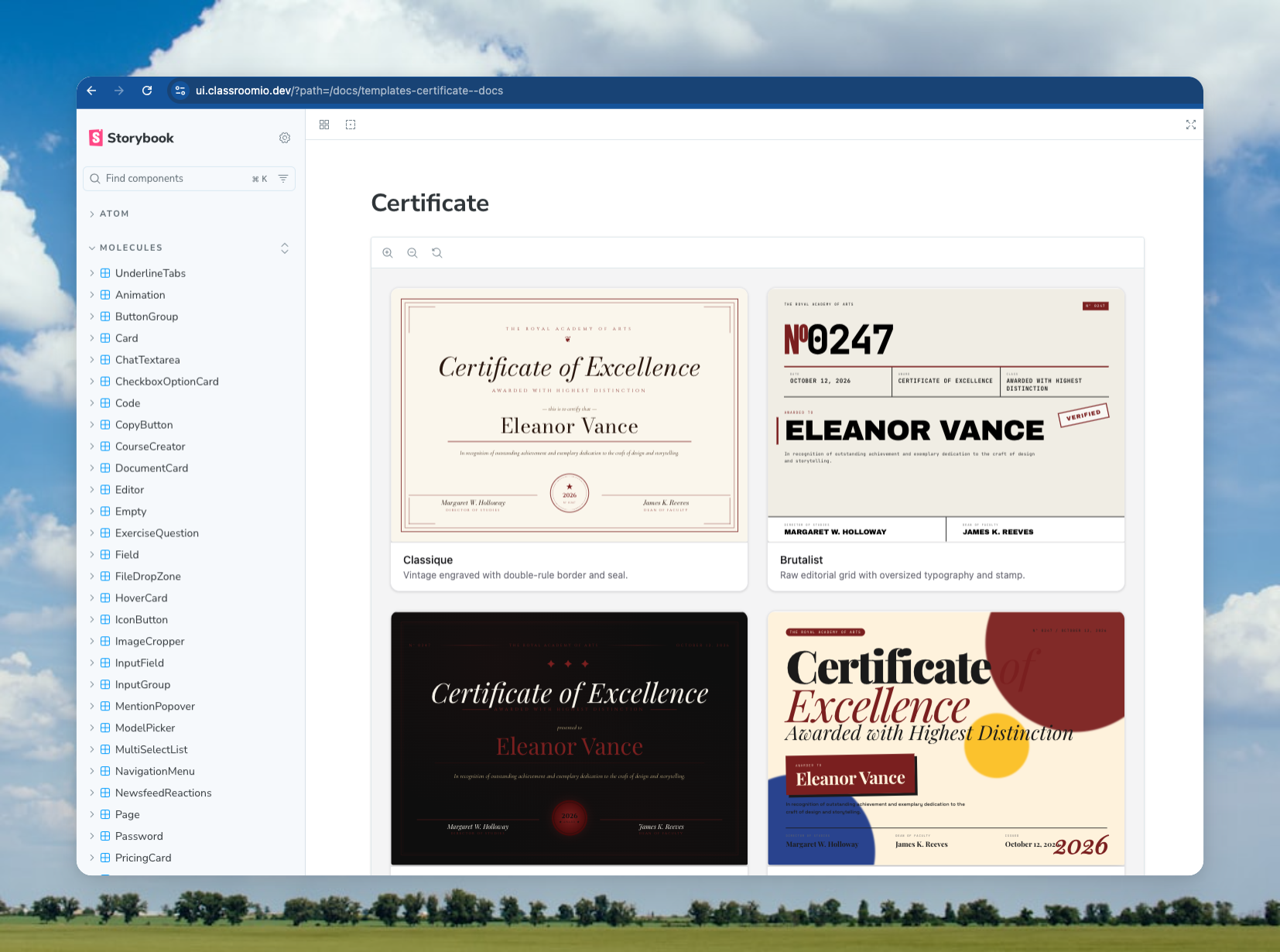
To run it locally:
cd packages/storybook && pnpm dev
See packages/storybook/README.md for detailed instructions on creating stories and publishing.
Content Structure
Base Components (src/base/)
All components in the base directory are primarily from shadcn-svelte. These are the foundational UI components that follow the shadcn design system.
Guidelines:
- Any new component from shadcn-svelte should be added to the
basedirectory - Components are organized in their own folders with an
index.tsfile for exports - Each component folder typically contains the main component file(s) and an
index.tsexport file
Examples:
base/button/- Button component from shadcn-sveltebase/dialog/- Dialog component from shadcn-sveltebase/tooltip/- Tooltip component from shadcn-svelte
Custom Components (src/custom/)
Components in the custom directory come from various sources or are built on top of base components:
-
External Sources:
- Components from shadcn-svelte-extras
- Components from Edra Editor (rich text editor)
- Other third-party component libraries
-
Extended Components:
- Any component that builds on top of shadcn-svelte base components
- Custom implementations that extend base component functionality
Examples:
custom/code/- From shadcn-svelte-extras (syntax-highlighted code block with copy and overflow)custom/underline-tabs/- From shadcn-svelte-extrascustom/editor/- Rich text editor based on Edra/Tiptapcustom/image-cropper/- Custom image cropping componentcustom/checkbox-field/- Field component built on top of base Checkboxcustom/newsfeed-reactions/- Newsfeed reaction picker and summary used by course and program feedscustom/course-creator/- ChatGPT-style course creation input with level and type selects
Exercise question (src/custom/exercise-question/)
Learner and author UIs for exercise questions (take, preview, review, submission, edit per question type).
renderers/shared/— Cross-type presentation pieces reused by multiple question families (for examplelabeled-value-row.svelte,mcq-preview-option-row.svelte,submission-response-pie-chart.svelte). Mode entry files stay thin; add new shared pieces here when two or more types need the same markup.renderers/<question-type>/— One folder per type (radio,numeric, …) containingtake.svelte,preview.svelte, and optionalreview.svelte,submission.svelte,edit.svelte, plus type-specific fragments (for examplenumeric-expected-fields.svelte,ordering-display.svelte).renderers/option-image.svelte,renderers/submission-utils.ts— Existing shared helpers at therenderers/root; keep importing from there unless consolidating in a later pass.
Types with heavier or distinct UIs (textarea editor, file upload, matching/hotspot authoring, link lists) intentionally keep separate take / preview implementations until a second consumer (for example a dedicated review mode) justifies extracting more shared fragments.
Question type picker (src/custom/question-type-picker/)
Marketing / demo widget: left-hand list of question types and a live take-mode preview using ExerciseQuestion.QuestionRenderer. Copy is English-only (no dashboard i18n). Also consumed by the @cio/embeds app as a CDN bundle (apps/embeds).
Live session card (src/custom/live-session-card/)
Presentational card for a live-class lesson with three states (live, upcoming, ended) derived from lessonAt + durationMinutes, or forced via the status prop (used by Storybook). Shows a join/copy action set when live, an "Add to calendar" combo button (Google, Outlook.com, Office 365, Yahoo, plus an .ics download for Apple) and a countdown when upcoming. All copy is passed in via the labels: LiveSessionLabels prop, so the dashboard wrapper supplies translated strings; onCopyLink fires after the link is copied (e.g. for a snackbar). See Molecules/LiveSessionCard in Storybook.
Hooks (src/hooks/)
Reusable Svelte hooks are located in the src/hooks/ directory. These are Svelte 5 runes-based utilities that can be used across components.
Available Hooks:
is-mobile.svelte.ts- Media query hook for mobile breakpointsuse-clipboard.svelte.ts- Clipboard copy functionality with state management
Usage:
<script lang="ts">
  import { isMobileStore } from '@cio/ui/hooks/is-mobile.svelte';
  import { UseClipboard } from '@cio/ui/hooks/use-clipboard.svelte';
</script>
Tools (src/tools/)
Utility functions and helpers are located in src/tools/. The main utility is the cn function for class name merging.
Importing cn
The cn utility function is used throughout the codebase for merging Tailwind CSS classes. It combines clsx and tailwind-merge to handle class conflicts intelligently.
Import:
import { cn } from '../../tools';
Example usage:
<script lang="ts">
  import { cn } from '../../tools';

  let { class: className } = $props();
</script>

<div class={cn('ui:bg-primary ui:text-white', className)}>Content</div>
The cn function is exported from src/tools/index.ts and is also available as a named export from the main package:
import { cn } from '@cio/ui';
Tailwind Prefix
All Tailwind CSS classes in this package use a custom prefix: ui
This ensures that styles don't conflict with other Tailwind configurations in consuming applications.
Usage:
<div class="ui:bg-primary ui:text-primary-foreground ui:rounded-md">Content</div>
Note: When adding new components or styles, always use the ui: prefix for all Tailwind classes.
Component Exports
Components are exported from the main src/index.ts file in an alphabetical order. There are two main export patterns:
Base Components
Base components are exported as namespaced exports:
export * as Button from './base/button';
export * as Dialog from './base/dialog';
export * as Tooltip from './base/tooltip';
Usage:
<script lang="ts">
  import { Button, Dialog, Tooltip } from '@cio/ui';
</script>

<Button.Root>Click me</Button.Root>
<Dialog.Root>...</Dialog.Root>
Custom Components
Custom components may use namespaced exports or direct exports depending on their structure:
// Namespaced
export * as UnderlineTabs from './custom/underline-tabs';

// Direct exports
export { Chip } from './custom/chip';
export { IconButton } from './custom/icon-button';
Usage:
<script lang="ts">
  import { UnderlineTabs, Chip, IconButton } from '@cio/ui';
</script>
Component Index Files
Each component directory contains an index.ts file that exports the component and its types:
// base/button/index.ts
import Root, { type ButtonProps, buttonVariants } from './button.svelte';

export { Root, Root as Button, type ButtonProps, buttonVariants };
Adding New Components
When adding a new component to this package, follow these steps:
-
Determine the location:
- If it's from shadcn-svelte → add to
src/base/ - If it's from another source or extends base components → add to
src/custom/
- If it's from shadcn-svelte → add to
-
Create the component structure:
- Create a folder with the component name (kebab-case)
- Add the component file(s)
- Create an
index.tsfile for exports
-
Export from main index:
- Add the export to
src/index.ts
- Add the export to
-
Add Tailwind prefix:
- Run
pnpm prefixto automatically add theui:prefix to all Tailwind classes
- Run
-
Create a Storybook story:
- Required: After adding a new component, you must add a story for it in
packages/storybook - See
packages/storybook/README.mdfor detailed instructions on how to create stories - Stories help document component usage and enable visual testing
- Required: After adding a new component, you must add a story for it in
Development
Scripts
pnpm generate-css- Generate CSS from Tailwindpnpm build- Build the packagepnpm dev- Watch mode for CSS generationpnpm format- Format code with Prettierpnpm prefix:list- List files that need theui:prefix (dry-run, exit 0)pnpm prefix:check- Fail if any file undersrc/needs theui:prefixpnpm prefix:check:staged- Fail if stagedpackages/uifiles need the prefix (pre-commit)pnpm prefix:check:changed- Fail if changedpackages/uifiles need the prefix (CI; setUI_PREFIX_GIT_BASE)pnpm prefix- Addui:prefix to all Tailwind classes and format
Configuration
components.json- shadcn-svelte configurationjsrepo.json- jsrepo configuration for component installationsvelte.config.js- Svelte configurationtsconfig.json- TypeScript configuration